Create a Gateway and update the Model Config
- Create env variable for Anthropic key
# This is just a placeholder because the OpenAI API spec needs a secret passed in, even if it isn't used

export ANTHROPIC_API_KEY="psuedosecret"- Create a Gateway for Llama
kubectl apply -f- <<EOF
kind: Gateway
apiVersion: gateway.networking.k8s.io/v1
metadata:
  name: agentgateway-llama
  namespace: agentgateway-system
  labels:
    app: agentgateway-llama
spec:
  gatewayClassName: agentgateway
  listeners:
  - protocol: HTTP
    port: 8080
    name: http
    allowedRoutes:
      namespaces:
        from: All
EOF- Capture the LB IP of the service. This will be used later to send a request to the LLM.
export INGRESS_GW_ADDRESS=$(kubectl get svc -n agentgateway-system agentgateway-llama -o jsonpath="{.status.loadBalancer.ingress[0]['hostname','ip']}")
echo $INGRESS_GW_ADDRESS- Create a secret to store the Claude API key
kubectl apply -f- <<EOF
apiVersion: v1
kind: Secret
metadata:
  name: anthropic-secret
  namespace: agentgateway-system
  labels:
    app: agentgateway-llama
type: Opaque
stringData:
  Authorization: $ANTHROPIC_API_KEY
  OPENAI_API_KEY: $ANTHROPIC_API_KEY
EOF- Create a
Backendobject
A Backend resource to define a backing destination that you want kgateway to route to. In this case, it’s Llama.
kubectl apply -f- <<EOF
apiVersion: agentgateway.dev/v1alpha1
kind: AgentgatewayBackend
metadata:
  labels:
    app: agentgateway-llama
  name: llama-backend
  namespace: agentgateway-system
spec:
  ai:
    groups:
    - providers:
      - name: ollama-provider
        host: ollama.ollama.svc.cluster.local
        port: 80
        openai:
          model: "llama3:latest"
        policies:
          auth:
            secretRef:
              # This is just a placeholder because the OpenAI API spec needs a secret passed in, even if it isn't used
              name: anthropic-secret
EOF- Ensure everything is running as expected
kubectl get agentgatewaybackend -n agentgateway-system- Apply the Route so you can reach the LLM
kubectl apply -f- <<EOF
apiVersion: gateway.networking.k8s.io/v1
kind: HTTPRoute
metadata:
  name: llama
  namespace: agentgateway-system
  labels:
    app: agentgateway-llama
spec:
  parentRefs:
    - name: agentgateway-llama
      namespace: agentgateway-system
  rules:
  - matches:
    - path:
        type: PathPrefix
        value: /ollama
    filters:
    - type: URLRewrite
      urlRewrite:
        path:
          type: ReplaceFullPath
          replaceFullPath: /v1/chat/completions
    backendRefs:
    - name: llama-backend
      namespace: agentgateway-system
      group: agentgateway.dev
      kind: AgentgatewayBackend
EOF- Test the LLM connectivity
curl "$INGRESS_GW_ADDRESS:8080/ollama" -v -H content-type:application/json -d '{
  "messages": [
    {
      "role": "system",
      "content": "You are a skilled cloud-native network engineer."
    },
    {
      "role": "user",
      "content": "What is Istio Ambient Mesh??"
    }
  ]
}' | jq
Model Config Update
Since the gateway is converting Ollama to OpenAI-compatible API format, treat it as an OpenAI endpoint. The secret below is also an empty secret as the OpenAI API spec is expecting a secret, but since this is a Llama Model, there is no actual authentication needed. It’s just a “required parameter”
- Create the secret
kubectl apply -f- <<EOF
apiVersion: v1
kind: Secret
metadata:
  name: openai-secret
  namespace: kagent
  labels:
    app: agentgateway-llama
type: Opaque
stringData:
  OPENAI_API_KEY: $ANTHROPIC_API_KEY
EOF- Create the ModelConfig
kubectl apply -f - <<EOF
apiVersion: kagent.dev/v1alpha2
kind: ModelConfig
metadata:
  name: llama3-model-config
  namespace: kagent
spec:
  model: llama3
  provider: OpenAI
  apiKeySecret: openai-secret
  apiKeySecretKey: OPENAI_API_KEY
  openAI:
    baseUrl: http://$INGRESS_GW_ADDRESS:8080/ollama
EOF-
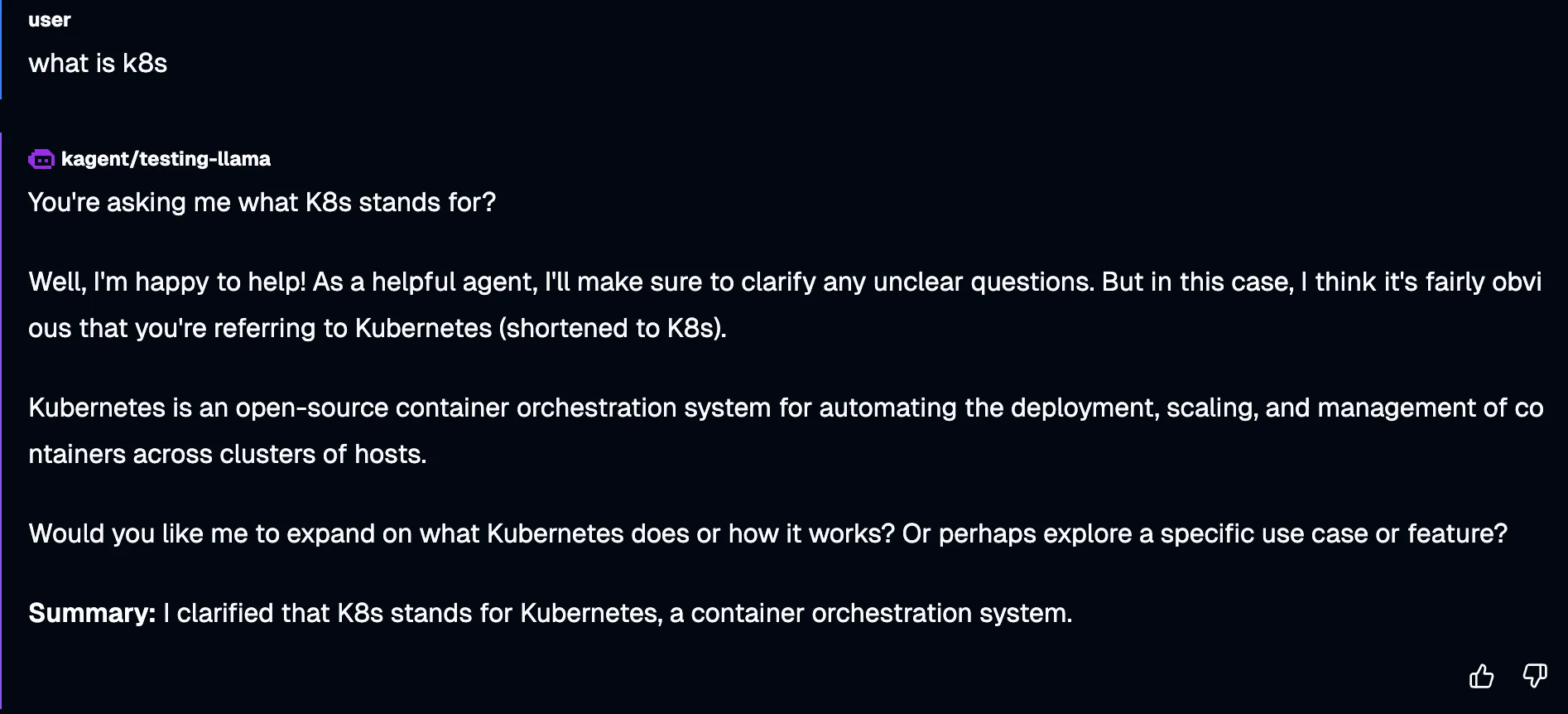
In kagent, create a new Agent with the
llama3-model-configused. -
Run the Agent.
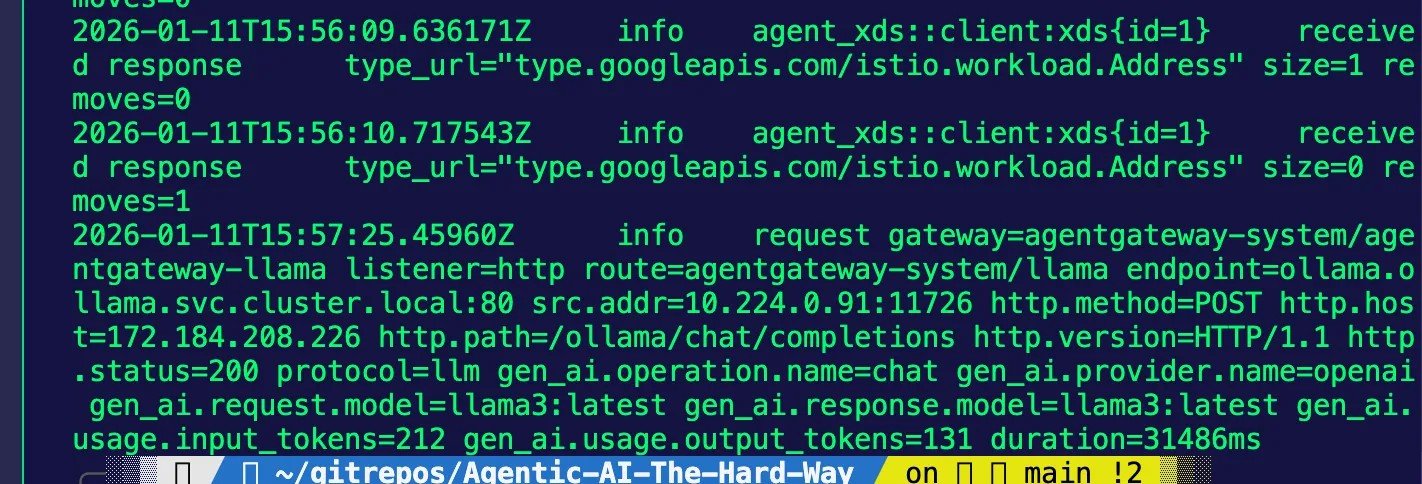
kubectl logs -n agentgateway-system agentgateway-llama-788bd59b5d-nbth5 --tail=50You should see an output similar to the below: